Governing AI agents' tool access: what an MCP gateway is for, and how to pilot one
AI clients now reach company systems through MCP. A practical guide for IT and security leaders to the risks (shadow servers, credentials on laptops, no audit), the options (build, vendor admin controls, a gateway) and a two-to-four-week pilot.
A year ago, "the AI tool" in most companies was a chat window. Today Claude Code, Cursor, VS Code and ChatGPT can open pull requests, query databases, file tickets and post to Slack. They do it through the Model Context Protocol (MCP): an AI client connects to an MCP server, the server offers tools, and the model decides which ones to call.
That's useful, and it moves a governance question onto your desk. For every agent in your organization you should be able to answer three things: which tools can it reach, whose credentials does it use, and what did it actually do? This post is about how to answer them without banning the tools your engineers already rely on.
What changes when agents call tools
Adding an MCP server is usually one line of client configuration. Claude Code's own administrator documentation is direct about the default: "By default, anyone running Claude Code can connect any MCP server they choose." Unless someone configures otherwise, that leads to five problems:
- Shadow MCP servers. Servers nobody in IT knows about, from sources nobody reviewed. A server's tool descriptions go straight into the model's context, which is how tool poisoning and rug pulls work.
- Credentials on laptops. Each server needs access to something: a GitHub token, a database password, a SaaS API key. Those end up in config files and environment variables on developer machines, often long-lived and personal, and they don't leave when the person does.
- No audit trail. The MCP specification says clients should "log tool usage for audit purposes". Where they do, the logs are per client and per device. Nobody can answer "what did agents do in the payments repository last Tuesday, and on whose behalf?"
- Over-broad access. An agent typically gets everything its human can reach through a server, even when the job needs two tools.
- No brakes on writes. Clients can ask the user to confirm a call, but the person confirming is the person who started the agent, and clients let users turn confirmations off.
What an MCP gateway is
An MCP gateway is a server that sits between AI clients and your MCP servers. Clients connect to one endpoint; behind it, the gateway connects to the upstream servers. Every call passes through a policy point you control. In Neurouter, a tool call goes through these steps:
- The client sends the request to
/mcpover Streamable HTTP. - The gateway checks the caller's OAuth access token or API key.
- It resolves the tool and applies access control. A tool the caller may not use looks exactly like a tool that doesn't exist.
- It validates the arguments against the tool's pinned schema.
- It applies rate limits per agent and per agent and tool.
- If the tool requires human approval, it holds the call until someone decides.
- It calls the upstream server with credentials the gateway holds. The client's token is never forwarded; the MCP specification forbids that "token passthrough".
- It returns the result and writes the audit record and metrics.
The point isn't the proxy. It's that identity, credentials, policy and evidence live in one place, for every client.
Three ways to govern it
| Build your own | Client admin controls | A gateway | |
|---|---|---|---|
| Decides which servers a client loads | No | Yes, enforced on the device | No (it can't see clients that bypass it) |
| Covers every client product | Yes | No, one product at a time | Yes |
| Upstream credentials off laptops | If you build it | No | Yes |
| Per-tool access for users, groups and agents | If you build it | Varies by client | Yes |
| Human approval of specific calls | If you build it | The user confirms their own calls | Yes, by someone else |
| Central, per-call audit trail | If you build it | Usage telemetry per client | Yes |
| Ongoing cost | A team, indefinitely | Low | Running one more service |
Client admin controls are worth turning on whatever else you do. Claude Code, for example, supports a managed-mcp.json file deployed by MDM that fixes the set of servers users get, and allowedMcpServers / deniedMcpServers lists that match servers by URL or exact command. With OTEL_LOG_TOOL_DETAILS=1 it can export which MCP servers and tools people use. GitHub offers a private MCP registry for Copilot, which its own documentation describes as a public preview and "not the recommended method for restricting access to MCP servers". These controls decide what a client may connect to. They don't hold credentials, check individual tool calls or produce one audit trail across clients, and every vendor's controls are different.
Building your own looks easy because the proxy part is easy. The work is in the rest: an OAuth 2.1 authorization server that MCP clients can discover (RFC 9728 and RFC 8414 metadata, audience-bound tokens per RFC 8707, client registration), per-user OAuth to upstream SaaS with the confused-deputy protections the spec requires, SSRF guards, two protocol versions in use at once (2025-11-25 and 2026-07-28, which removed protocol sessions), an audit log you can defend, and a review UI. If you have a platform team that wants to own that indefinitely, it's a legitimate choice.
A gateway gives you those pieces off the shelf. There are several, open source and commercial; we keep a sourced comparison that includes where others are stronger than Neurouter.
Use them together
The two kinds of control fit together well. Use client policy to make the gateway the only server a client loads, and let the gateway decide everything behind it. For Claude Code, that's a managed-mcp.json with one entry, deployed to /Library/Application Support/ClaudeCode/ on macOS, /etc/claude-code/ on Linux or C:\Program Files\ClaudeCode\ on Windows:
{
  "mcpServers": {
    "neurouter": { "type": "http", "url": "https://mcp.example.com/mcp" }
  }
}
People then authenticate once from Claude Code's /mcp menu, which opens your identity provider's sign-in through Neurouter. No credential is in the file. Note the trade-off: exclusive control also blocks local stdio servers, which Neurouter can't host yet. If your teams depend on some, allowlist those exact commands instead of deploying exclusive control.
How to run a pilot
A pilot should take two to four weeks and answer a specific question, not demonstrate that a proxy works.
1. Choose the scope. Two or three remote MCP servers with clear owners: one read-mostly (internal docs search), one that writes (your Git host or ticketing system). Five to twenty people who already use AI clients, plus one CI job.
2. Evaluate locally first. The quickstart runs Neurouter on one machine with SQLite or Docker Compose and a development-only login. Half a day is enough to see the console and connect a client.
3. Deploy the pilot properly. Use the Helm chart or a container with PostgreSQL, an https URL, your OIDC provider (Entra ID, Okta, Google Workspace or Keycloak) and three generated secrets. Map an IdP group to the Admin and Auditor roles. See Deployment.
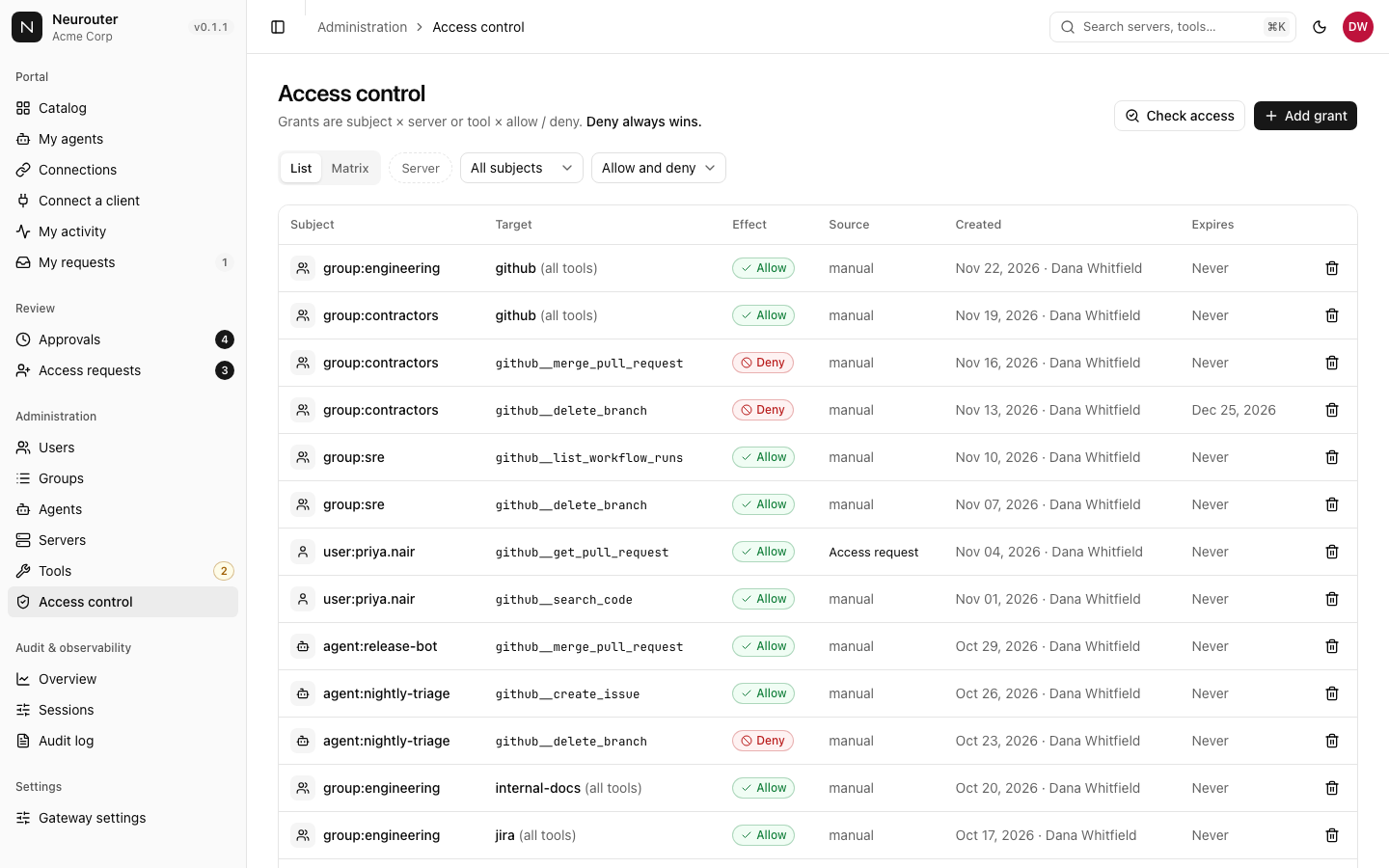
4. Set policy before inviting anyone. Register the servers and review their tools; a new tool isn't callable until it's approved (unless you turn on auto-approve for that server). Grant tools to the pilot group (there is no access without a grant, including for admins). Flag the write tools as requires approval. Give the CI job its own agent with an API key, narrowed to the two tools it needs.
5. Send the evidence somewhere else. Configure the audit webhook or OpenTelemetry logs export to your SIEM, and set retention to what your policy requires.
6. Measure. At the end, look at:
- Blocked calls (
neurouter_tool_calls_totalby decision): denials point at missing grants or at agents reaching for things they shouldn't. - Approval wait times and outcomes (
neurouter_approval_wait_seconds): if people wait minutes for routine calls, you flagged too much. - Definition changes your servers made during the pilot, and how long reviews took.
- Tools nobody used: candidates to stop granting.
- The question you started with: pick a day and an agent, and time how long it takes to say what it did and on whose behalf.
What a gateway doesn't solve
- It sees tool calls, not the conversation. Prompts and answers that never become a tool call aren't logged.
- It only governs traffic that goes through it. Client policy, network egress rules and credential hygiene still matter.
- Specific to Neurouter today (v0.1.1): it proxies remote servers (Streamable HTTP and SSE) but doesn't host stdio servers yet; it supports tools only, not MCP resources or prompts; clients see two meta-tools (
search_toolsandcall_tool) instead of the full tool list; there's no SCIM or SAML yet; one deployment serves one organization; and the managed Neurouter Cloud isn't available. It's a new project from a small company, which matters for your vendor assessment.
Try it
Click through a simulated company in the live demo, which runs entirely in your browser, or read the code on GitHub. Everything described here is in the Apache-2.0 edition; there's no paid tier for SSO, access control or audit. To go deeper: access control, the security model and the compliance mapping.