MCP server library and quality grades
Search a local copy of the official MCP Registry from the Neurouter console, see a deterministic A–F quality grade and a publisher badge for each server, and add a server to the gateway in a few clicks.
The library is a local, searchable copy of an MCP registry, by default the Official MCP Registry. Admins open it from Administration → Library. Each server shows a quality grade from A to F and a publisher badge. Add to gateway opens the usual registration form, already filled in.
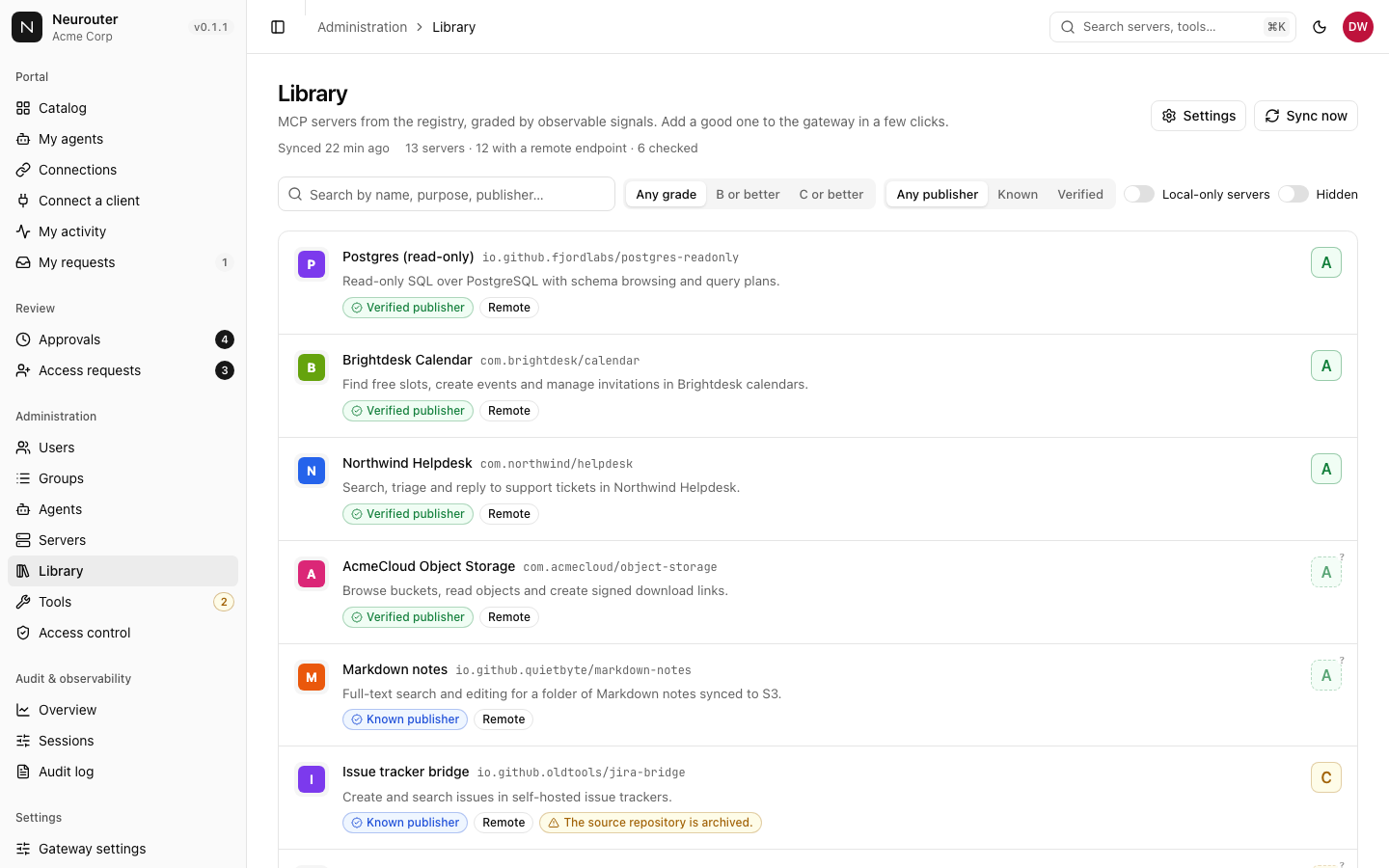
The registry has tens of thousands of entries and does very little moderation. It says consumers should "assume minimal-to-no moderation". Many entries are copies, templates or mass-published wrappers. The grade exists to tell good servers from the rest.
Turning on registry sync
Registry sync is off by default, so an air-gapped installation makes no outbound requests. To turn it on, open Library → Settings:
| Setting | Default | Notes |
|---|---|---|
| Sync from the registry | off | When on, the gateway syncs every hour, at minute 7. Sync now starts a sync at once. |
| Check servers in the background | on | Applies only while sync is on. See Background checks. |
| Registry URL | https://registry.modelcontextprotocol.io | Any registry that implements the MCP registry API (GET /v0.1/servers), such as an internal mirror or subregistry. |
| GitHub token | none | Optional. Checks use it to read repository data. Without it, GitHub allows 60 lookups an hour. |
How the sync works:
- First sync: a full crawl of the latest versions.
- Every hour after that: only the entries changed since the last sync (
updated_since), with a 10-minute overlap. - Once a week: a full crawl again. Entries the registry no longer lists are marked deleted.
- If a crawl fails part-way, the next run resumes where it stopped.
- Replicas: only one replica syncs at a time.
What is stored:
- Deleted entries are kept as records but not shown.
- Entries with neither a remote endpoint nor a package are skipped.
- Package-only servers are stored but hidden unless you turn on Local-only servers. They run over stdio, which the gateway does not support yet.
Requests to the registry and to GitHub go through the strict outbound network policy, the same one used for icons and webhooks.
Searching
The search box matches the name, title, description, publisher and repository. The io.github. prefix that starts more than half of all names is not indexed, so searching for "github" finds GitHub-related servers rather than every server published from a GitHub account. On Postgres, descriptions are matched with English stemming. Results are ranked by text match, and a better grade lifts a result. Filters:
- Minimum grade: B or better, C or better.
- Publisher: Verified, or Known (which includes verified).
- Local-only servers: also show package-only (stdio) servers.
- Hidden: also show entries an admin has hidden. Use Hide on an entry page to drop it from everyone's results.
Library entries never appear in the user catalog or in tool search. Users only see servers an admin has added to the gateway and granted to them.
Checking a server
Check now on an entry page:
- Connects to the endpoint without credentials, through the strict outbound policy. Private and internal network addresses are refused, because library URLs come from strangers.
- Lists and lints the tools, if the server allows anonymous listing.
- Reads the protected-resource metadata (RFC 9728) if the server asks for sign-in.
- Looks up the GitHub repository.
The grade is then recomputed with more evidence, so its confidence goes up. Requiring sign-in is not counted against a server when OAuth discovery works, or when the entry declares the header it needs.
Tools and icons
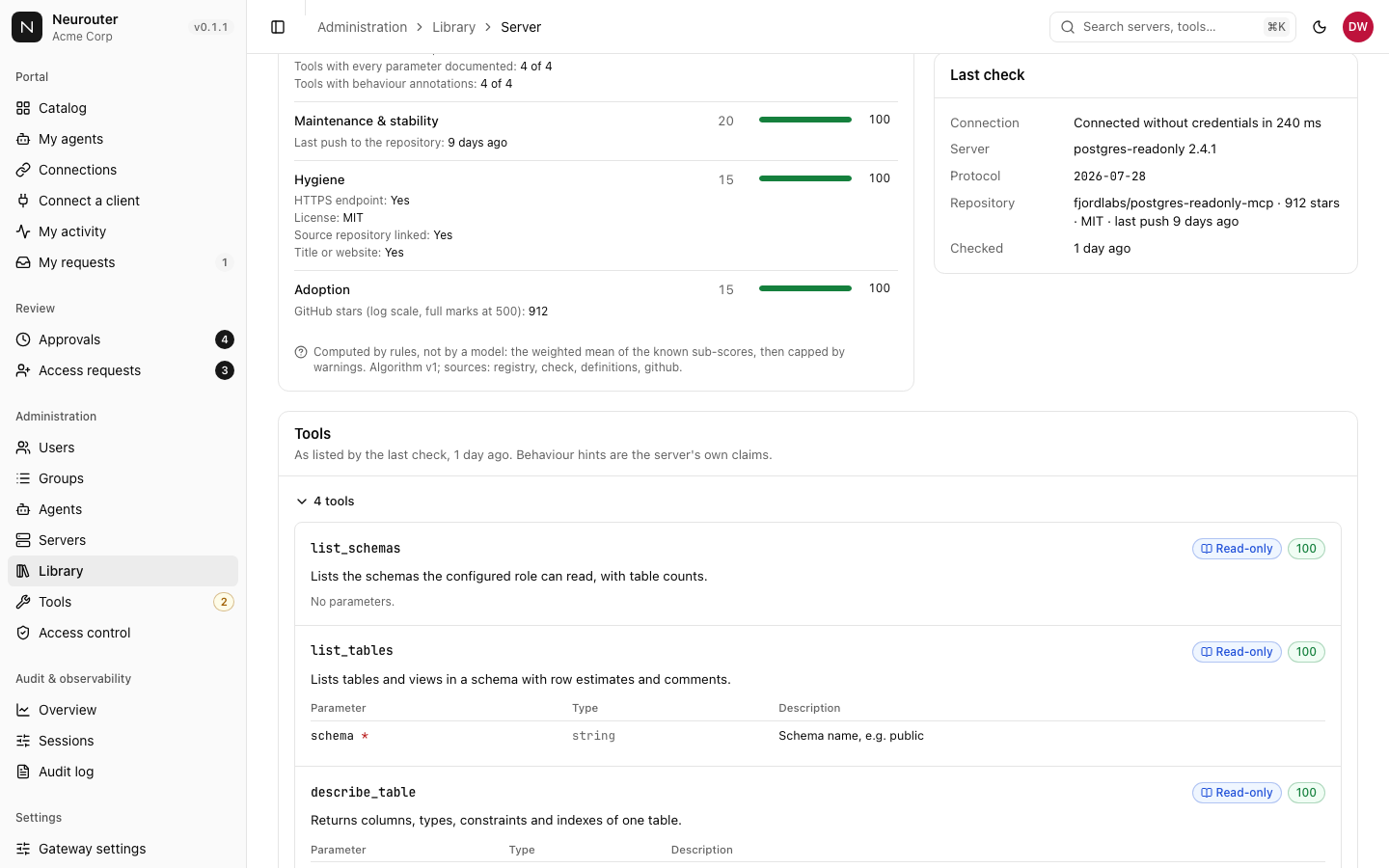
Tools. After a check, the entry page lists the server's tools. For each tool you see:
- its description;
- a parameter table (name, type, whether it's required, and what it's for);
- the server's behaviour hints (read-only, destructive, idempotent, open world), shown as the server's own claims;
- its lint score and notes.
A server that requires sign-in doesn't list its tools to an anonymous check. Add it to the gateway to see them; they wait for review there as usual.
Icons. Each entry shows an icon. The gateway uses the first of these that works:
- the icon declared in the registry entry;
- the website's touch icon or favicon (a PNG inside a
.icofile is extracted); - the GitHub owner's avatar.
The console never loads images from third-party sites:
- The gateway fetches each icon through the strict outbound policy, with a 5-second timeout and a 256 KB limit.
- It checks the file type from the image bytes and screens SVGs for scripts and external references.
- It caches icons for 30 days, and a missing icon for 7 days.
- Icons are fetched only while registry sync is on.
Background checks
While sync is on, the gateway checks servers in the background, so grades don't stay preliminary until someone clicks Check now.
- How often: every 10 minutes, up to 20 servers per run, 4 at a time.
- Which servers first: verified publishers, then known publishers, then the rest by grade.
- Which servers are picked: ones never checked, or last checked more than a week ago.
- Skipped:
- servers already capped at D or F by registry metadata, since a check cannot lift a cap;
- hidden servers;
- endpoints whose URL still needs variables.
- GitHub: background checks read GitHub only when a token is set, because without one GitHub allows 60 lookups an hour.
Turn Check servers in the background off in Library → Settings if the gateway should only connect to servers when an admin asks.
How the grade works
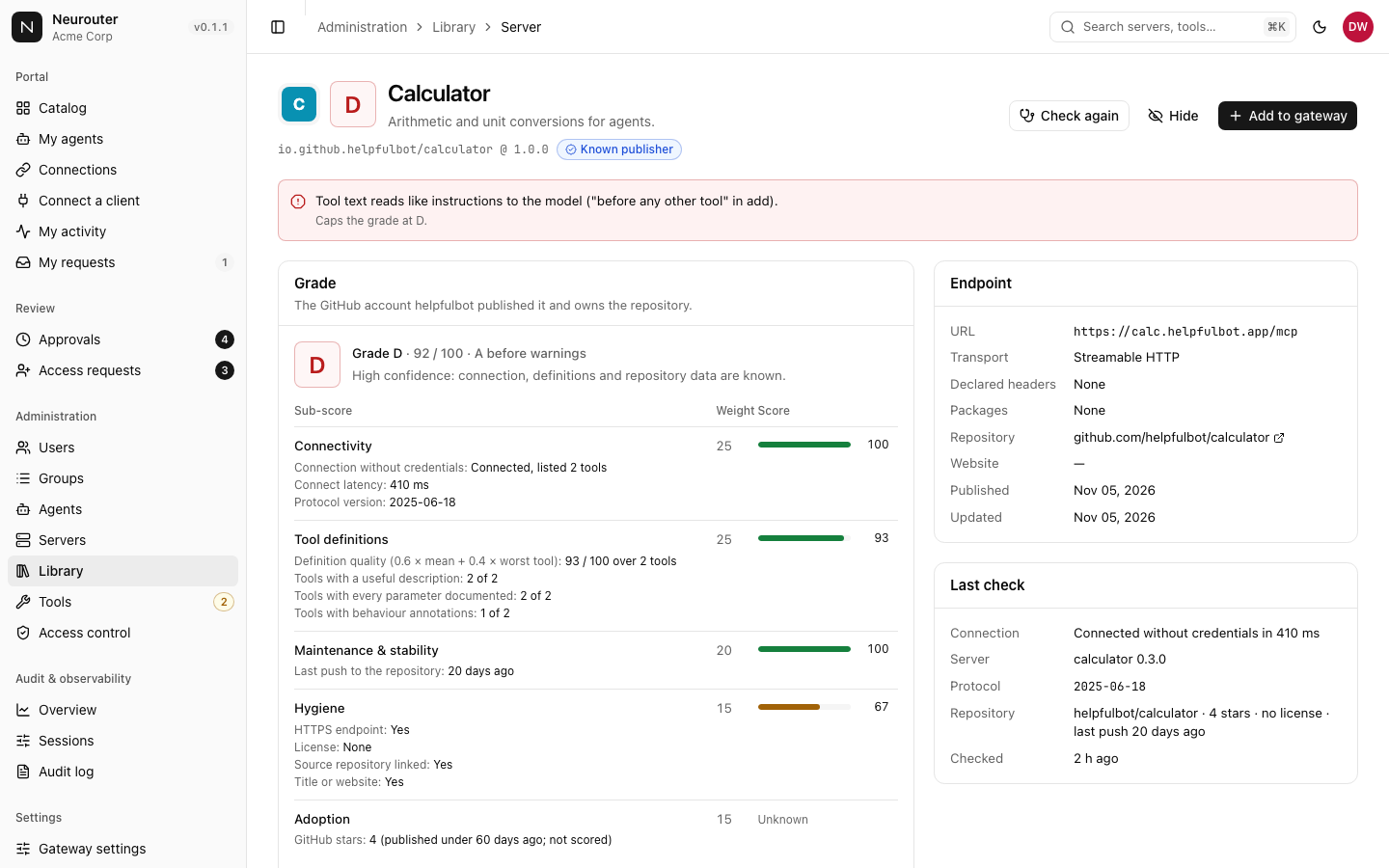
The grade is computed by rules in code, not by a language model. It uses only signals the gateway can observe, and the page lists every input. The code is in packages/shared/src/library/grading.ts. This page describes algorithm version 1.
Five sub-scores
Each sub-score is between 0 and 1:
| Sub-score | Weight | Signals |
|---|---|---|
| Connectivity | 25 |
|
| Tool definitions | 25 | The definition lint (next section). |
| Maintenance & stability | 20 |
|
| Hygiene | 15 |
|
| Adoption | 15 |
|
From sub-scores to a grade
- The grade is the weighted mean of the sub-scores that have data: A ≥ 85, B ≥ 70, C ≥ 55, D ≥ 40, otherwise F.
- Unknown is not zero. A sub-score with no data is left out and shown as Unknown. A new server isn't marked down for having no history.
- Young repositories: a repository published less than 60 days ago with under 50 stars gets no adoption score yet.
- Confidence is the share of the total weight that had data: low below 40, medium up to 75, high above 75. A grade is never high-confidence unless the server's tools were seen.
- Preliminary grades: in the list, a low-confidence grade is drawn dashed with a question mark. Before a check, only registry metadata is known.
The definition lint
Each tool is scored on five things:
| Check | Weight | What earns it |
|---|---|---|
| Description | 35% | A description that is more than 20 characters and does more than restate the name. |
| Typed input schema | 25% | An object schema whose parameters all have a type. |
| Documented parameters | 20% | A description on every parameter. |
| Behaviour annotations | 10% | At least one of readOnlyHint, destructiveHint, idempotentHint or openWorldHint. |
| Valid name | 10% | Up to 64 characters from letters, digits, _, . and -. |
The server's score is 0.6 × the mean + 0.4 × the worst tool. One badly described tool pulls the whole server down, because agents can call any of them.
Red flags cap the grade
Some findings set a ceiling on the grade instead of lowering the average. The grade the server would otherwise have earned stays visible.
| Finding | Best possible grade |
|---|---|
Tool text that reads like instructions to the model, e.g. "ignore previous instructions", "do not tell the user", <IMPORTANT> blocks, requests for keys or ~/.ssh | D |
| Invisible Unicode (zero-width or bidirectional control characters) in tool text | D |
| A mass publisher: more than 500 servers under one namespace | D |
| An empty or template description, or the same description used by 5 or more publishers | D |
A plain-HTTP endpoint, or a placeholder host such as https://{host}/mcp | D |
| The endpoint didn't answer the last check, or the server lists no tools | D |
| Deprecated by the publisher, an archived repository, or under 90% uptime in our health checks | C |
| Removed by the registry | F |
Warnings that don't cap the grade:
- the name claims a domain but the endpoint is on another one;
- a tool named like a destructive action but marked read-only;
- descriptions longer than 2,000 characters;
- more than 80 tools;
- the endpoint asks for payment (HTTP 402) before listing anything (scored as half connectivity, not as down);
- frequent definition changes;
- definition versions rejected by your admins.
Publisher trust
The publisher badge is shown separately and is never averaged into the grade. A trustworthy publisher can ship an unproven server, and an anonymous one can ship an excellent server.
| Badge | Meaning |
|---|---|
| Verified publisher | A domain namespace (e.g. com.example/…) whose endpoint is on that domain or a subdomain of it. Or a GitHub organization namespace that owns the linked repository. |
| Known publisher | A GitHub user namespace that owns the linked repository. Or a domain namespace without a remote endpoint to compare. |
| Unverified | Nothing ties the name to the endpoint or the code. |
| Domain mismatch | The name claims a domain but the endpoint is somewhere else. |
The registry proves that a publisher controls the domain or GitHub account in the name. It does not check that the endpoint URL belongs to that publisher. Neurouter compares the two itself.
Adding a server from the library
Add to gateway opens Register a server with these fields filled in from the registry entry:
- Name and slug: a free slug is chosen.
- Description and URL: Streamable HTTP is preferred over SSE.
- Authentication: mapped from the declared header.
Authorizationbecomes a bearer token and any other header becomes a shared header. With no header but working OAuth discovery, it becomes per-user OAuth.
What you still do:
- choose the owner;
- enter any secrets;
- replace URL variables such as
{tenant}.
The server starts untrusted with strict definition pinning, so every tool waits for review as usual. Once added, the library entry shows In gateway.
Grades for servers already in the gateway
Every server, including servers added by hand, gets the same grade on its Overview tab. It is computed from:
- our own health checks;
- its current tool definitions;
- definition changes and rejections;
- who calls it.
If the server came from the library, its registry data and repository data are used too.
API
| Method and path | Who | Purpose |
|---|---|---|
GET /api/library/status | admin | Sync settings, state and counts |
PATCH /api/library/settings | admin | enabled, autoCheck, registryUrl, githubToken (write-only; null clears it) |
POST /api/library/sync | admin | Start a sync now |
GET /api/library | admin | Search: q, minGrade, trust, remoteOnly, includeHidden, sort, cursor, limit |
GET /api/library/:id | admin | Entry with grade breakdown, last check and an Add to gateway draft |
POST /api/library/:id/check | admin | Run a check and regrade |
PATCH /api/library/:id | admin | { "hidden": true } |
GET /api/servers/:id/quality | owner, auditor | Grade of a server in the gateway |
Changing settings, starting a sync, running a check and hiding an entry are all recorded in the audit log.
Registry data comes from the Official MCP Registry under CC0. A listing does not imply endorsement by the registry or by Neurouter.